Most CRM platforms are designed for the “average” business. But niche and vertical-focused companies are anything but average. A healthcare provider doesn’t operate like a logistics firm. A manufacturer doesn’t manage relationships the same way a nonprofit does. Yet many organizations still try to force their unique workflows into a generic CRM setup.
That disconnect creates friction. Teams avoid using the system. Important data gets tracked outside the CRM. Reporting becomes unreliable. Over time, the CRM turns into a compliance checkbox instead of a tool that actually supports growth.
This is where Dynamics 365 stands out. When you customize CRM correctly, it can mirror real business processes instead of reshaping them. Industry-specific data, workflows, and insights become part of everyday operations, not workarounds. Teams that invest in the right customization approach often see higher adoption, better data quality, and faster decision-making.
At CRM Stuff, we help businesses design and implement module-level customization in Dynamics 365 so the CRM actually fits their industry needs. If you want to understand what it takes to truly customize CRM for your business, you can explore our approach here.
This guide explains how Dynamics 365 can be customized for niche industries, why vertical alignment matters, and how the right strategy turns CRM into a long-term competitive advantage.
Customize CRM with Dynamics 365 means adapting the platform to match industry-specific workflows, data models, and compliance needs. Instead of using a generic setup, businesses customize CRM entities, processes, and automation so teams work faster, data stays accurate, and the system delivers measurable value for niche industries.
What Does It Mean to Customize Dynamics 365 for Niche Industries?
Customize CRM is not about adding complexity for the sake of it. It’s about making Dynamics 365 reflect how a business actually operates within its industry. Every vertical has unique terminology, processes, and success metrics that standard CRM configurations don’t account for.
In Dynamics 365, customization can range from simple configuration changes to deeper platform extensions. This includes tailoring data fields, redefining workflows, automating industry-specific processes, and designing dashboards that track the right KPIs.
For niche industries, this alignment is critical. When the CRM speaks the same language as the business, users adopt it naturally. Data becomes trustworthy. Leaders gain insights that are relevant, not generic.
Customization typically focuses on:
- Industry-specific entities and fields
- Process automation aligned with real workflows
- Role-based dashboards and reports
Why Generic CRM Fails Niche and Vertical Businesses
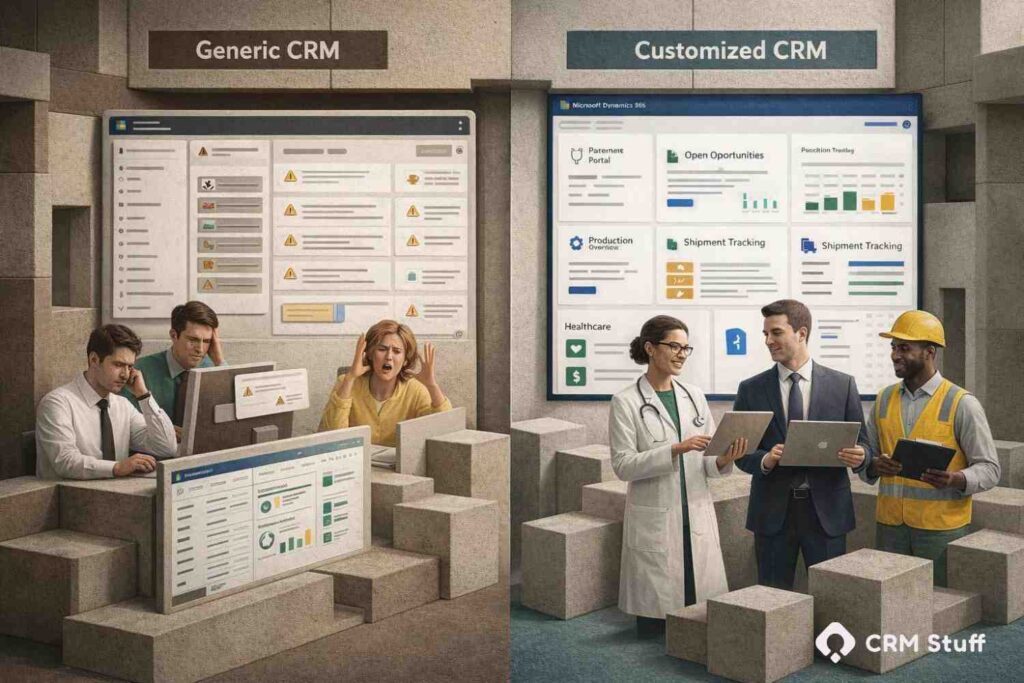
The debate between generic CRM vs customized CRM becomes clear when businesses operate in niche or regulated industries. Generic CRM systems are built on the assumption that most organizations sell, serve, and retain customers in the same way. In vertical markets, that assumption quickly fails.
When a CRM does not reflect real-world workflows, teams create workarounds. Spreadsheets, emails, and disconnected tools replace structured CRM processes. Over time, data becomes fragmented, reporting loses accuracy, and the CRM system no longer serves as a reliable source of truth.
In contrast, customized CRM solutions are designed around industry-specific workflows, data models, and compliance requirements. Instead of forcing teams to adapt to software limitations, the CRM adapts to how the business actually operates.
Ignoring vertical requirements has measurable business impact. Automation triggers at the wrong stages. Reports fail to capture meaningful KPIs. Compliance processes rely on manual intervention rather than built-in controls. These gaps directly affect operational efficiency and strategic decision-making.
Common consequences of using a generic CRM include:
- Low CRM user adoption across departments
- Incomplete, inaccurate, or siloed customer data
- Increased manual effort and slower processes
- Limited scalability and missed growth opportunities
For niche and vertical businesses, the choice is clear. Generic CRM may work as a starting point, but customized CRM is what drives long-term adoption, data quality, and business value.
Key Benefits of Vertical-Specific Dynamics 365 Customization
Customize CRM for a niche industry unlocks benefits that generic setups can’t deliver. The impact goes beyond usability and directly affects business performance.
Higher User Adoption and Productivity
When the CRM mirrors daily workflows, users don’t need to “translate” their work into the system. They log in, see familiar fields, and follow processes that make sense. Adoption increases naturally, and productivity follows.
Better Data Quality and Industry-Relevant Insights
Industry-specific fields and validations improve data accuracy. Reports and dashboards reflect real performance indicators instead of generic sales metrics. Leadership gains insights they can actually act on.
Streamlined Processes Aligned with Real Operations
Automation becomes meaningful when it supports actual business processes. Tasks trigger at the right time. Approvals follow correct paths. Teams spend less time managing the system and more time delivering value.
Faster Decision-Making Across Teams
With clean data and relevant dashboards, decisions no longer rely on assumptions. Teams see what’s happening in real time and respond faster to changes.
Scalable Foundation for Future Growth
Well-designed customization supports growth instead of blocking it. As the business evolves, the CRM can adapt without requiring a full rebuild.
Real-World Use Cases of Dynamics 365 in Niche Industries
Dynamics 365 is flexible enough to support a wide range of vertical use cases when customized correctly, especially as its underlying architecture continues to evolve toward more modular and adaptive models (as seen in The New Architecture Era: Why MCP Is Becoming the Backbone of Dynamics 365 ERP).
In healthcare, CRM can track patient interactions, referrals, and care coordination while aligning with regulatory requirements. Custom entities capture patient-specific data that standard CRM fields don’t support.
Financial services firms use Dynamics 365 to manage relationships while embedding compliance checks, audit trails, and risk profiling into everyday workflows.
Manufacturers often customize CRM to connect sales, production, and service data. Tracking equipment, warranties, and service history inside CRM gives teams a unified customer view.
Logistics and field service companies rely on customized CRM to manage assets, schedules, and service requests in real time, improving operational visibility.
Nonprofits adapt CRM to focus on donor relationships, grants, and program outcomes rather than traditional sales pipelines.
Step-by-Step Process to Customize Dynamics 365 for Vertical Success
Customize CRM should follow a structured approach to avoid unnecessary complexity and long-term issues.
Identify Industry-Specific Processes and KPIs
Start by understanding how the business actually operates. Document workflows, terminology, and metrics that define success in the industry.
Map Business Workflows to Dynamics 365 Capabilities
Translate real-world processes into CRM flows. Identify where configuration, automation, or extensions are needed.
Design Custom Entities, Fields, and Relationships
Create data models that reflect industry realities. Avoid overloading standard entities when custom ones make more sense.
Automate Processes Using Power Automate
Automation should reduce manual effort, not introduce risk. Focus on repeatable tasks that benefit from consistency.
Build Role-Based Dashboards and Reports
Different roles need different insights. Tailor dashboards so users see what matters to them immediately.
Test, Train, and Roll Out with End Users
Involve users early. Testing and training ensure the system feels intuitive before full adoption.
Govern, Monitor, and Optimize Over Time
Customization is not a one-time effort. Review performance, user feedback, and system health regularly.
Common Mistakes When Customizing Dynamics 365 for Niche Industries
One of the biggest mistakes is over-customizing without a clear business goal. Adding features because they seem useful often leads to complexity that users avoid.
Another common issue is ignoring change management. Even the best customization fails if users aren’t trained or involved in the process.
Hardcoding logic instead of using supported tools like Power Platform creates maintenance problems and upgrade risks.
Finally, many teams fail to plan for scalability. Customizations that work today may block growth tomorrow if governance isn’t considered.
Best Practices for Long-Term CRM Success in Vertical Markets
Successful CRM customization balances flexibility with discipline. Start with configuration before custom code, and use solution-based development to keep changes manageable and upgrade-safe.
Align CRM design with industry regulations early, not as an afterthought. Planning integrations with ERP, finance, or marketing systems upfront helps avoid data silos and rework later. Microsoft also recommends following structured customization and governance models to ensure long-term scalability and compliance .
Most importantly, measure success using industry-specific KPIs, not just generic CRM adoption or login metrics.
Conclusion
Customizing CRM with Dynamics 365 is not about making the system more complex — it’s about making it more relevant. For niche industries, relevance is what drives adoption, data quality, and real business impact. This is exactly where expert-led CRM customization makes the difference.
When CRM reflects how a business actually operates, it stops being a burden and starts becoming a strategic asset. Teams work more efficiently, leaders make better decisions, and the organization builds a scalable foundation for growth with the right Dynamics 365 customization approach in place.
Vertical success doesn’t come from forcing unique businesses into generic software. It comes from shaping the CRM around the business itself — something CRM Stuff specializes in delivering through tailored Dynamics 365 CRM solutions.
FAQs
What is a vertical CRM in Dynamics 365?
A vertical CRM is a Dynamics 365 setup customized to match the workflows, data, and regulations of a specific industry.
How much customization does Dynamics 365 allow?
Dynamics 365 supports extensive customization through configuration, Power Platform tools, and supported extensions.
Is Dynamics 365 suitable for regulated industries?
Yes. When customized correctly, Dynamics 365 can support compliance, auditing, and data governance requirements.
How long does it take to customize CRM for a niche industry?
Timelines vary, but most projects take weeks to a few months depending on complexity and scope.
Can a customized CRM scale as the business grows?
Yes. With proper design and governance, customized CRM solutions scale effectively over time.